
Play a song out loud. Six seconds later it’s your piano lesson.
Keybop is the piano learning app that hears every note on your own acoustic or digital piano, through the microphone or a MIDI cable. It waits while you learn, starts adults at the right level, and turns the songs you play into lessons. All on your phone; your audio is never stored.
- Mic or USB MIDI, any piano
- Wait mode never runs ahead
- Real engraved notation
- Audio never leaves your phone
- Compose, keep and share your own pieces
iOS is coming. How your data is handled.
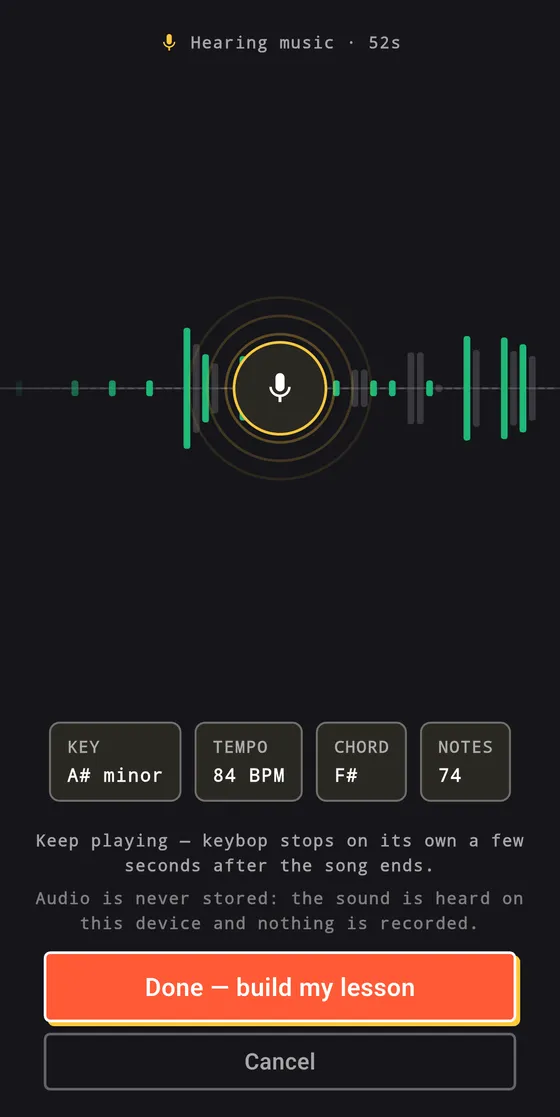
A real take, not a mock: a piano recording played through a speaker while the phone listened. Tap the button the way you would in the app.
See it in 15 seconds.
Play a piece, get four lessons from it, then practise with a score that waits for you. The film is silent.
Sound familiar?
The four things people say most about piano apps, and what Keybop does about each.
-
It doesn’t always hear the note.
Keybop’s note detector is checked on every build against recorded phone captures: every right note accepted, no wrong note accepted, a decision within 80 milliseconds. When it is unsure, it says so instead of blaming you.
-
It highlights the next note while I’m still thinking.
Wait mode never runs ahead. The right note moves the score on. A wrong one lets you try again, and it tells you when you are an octave out.
-
I can’t play the song I actually want.
Hold up the song from a speaker, or play it yourself. Keybop works out the key and tempo and writes it down as a lesson, split into bars you can drill.
-
It charged me again after the year ended.
No ads, ever. A real free tier. Premium is monthly or yearly with a 7-day free trial, cancelled in Google Play in two taps, or a single lifetime purchase that never renews. Nothing you have earned is ever locked again.
Quotes are paraphrased from public 2026 reviews of piano learning apps.
Try wait mode right here.
Play C, then E, then G. Miss one and watch what happens: nothing bad.
Inside the piano app.
The short tour of the piano app, one screen per idea. Swipe through.
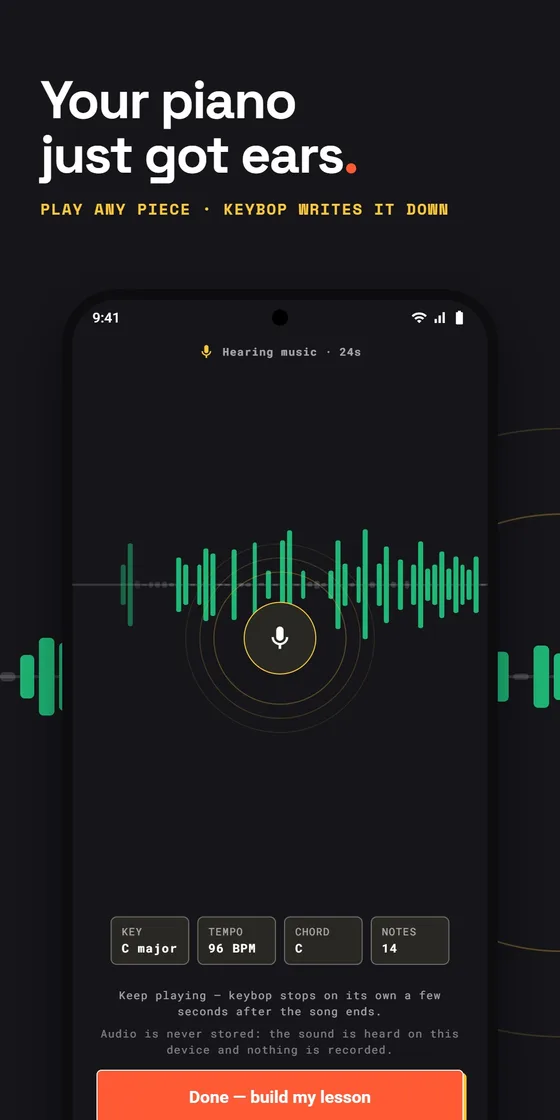
Listen mode hears you.
Play any piece on your own piano. Key, tempo, chord and note count update while you play.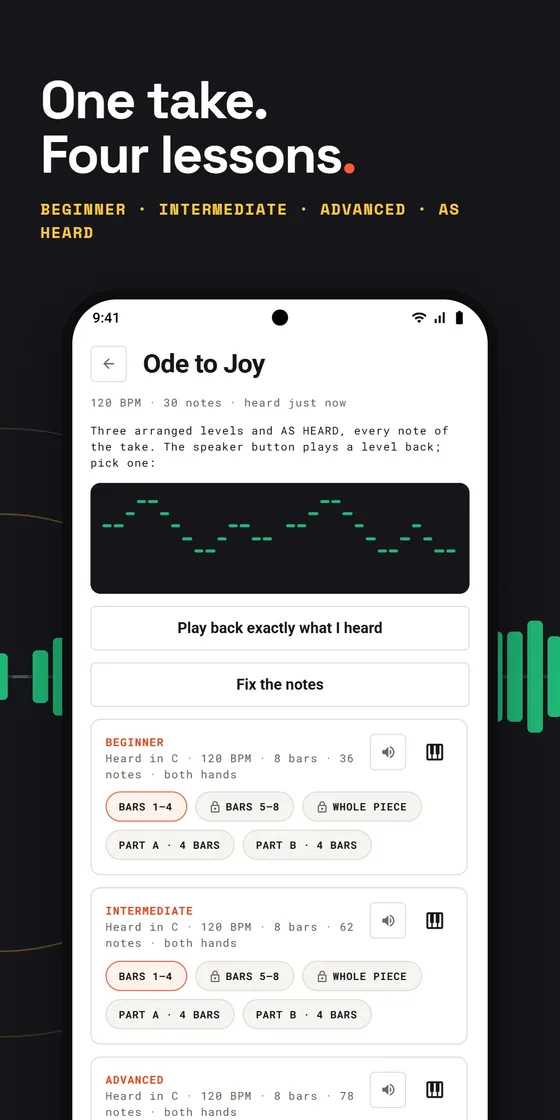
Four arrangements from one take.
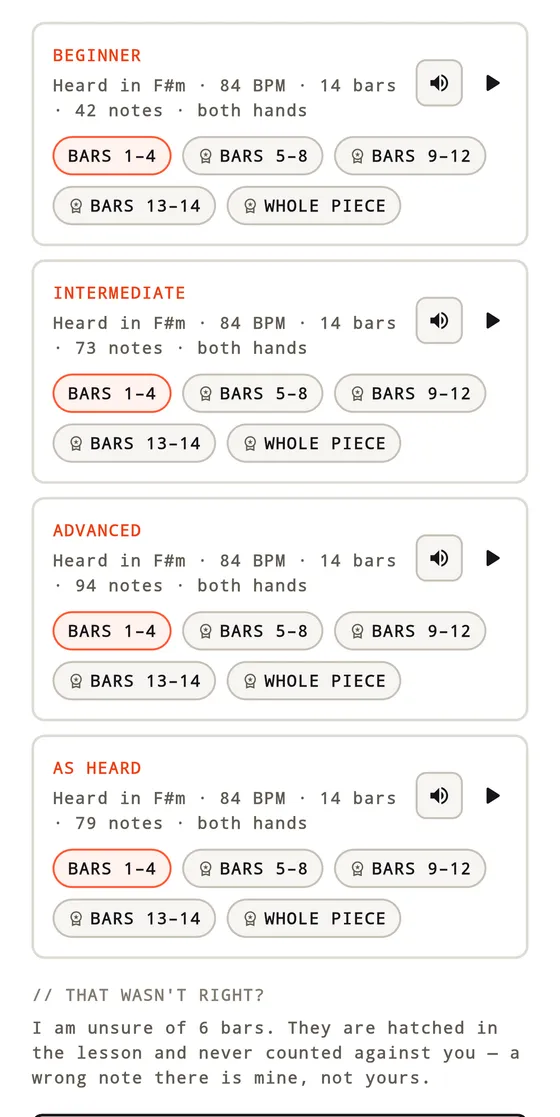
Beginner to advanced, plus exactly what it heard, split into bars you can drill.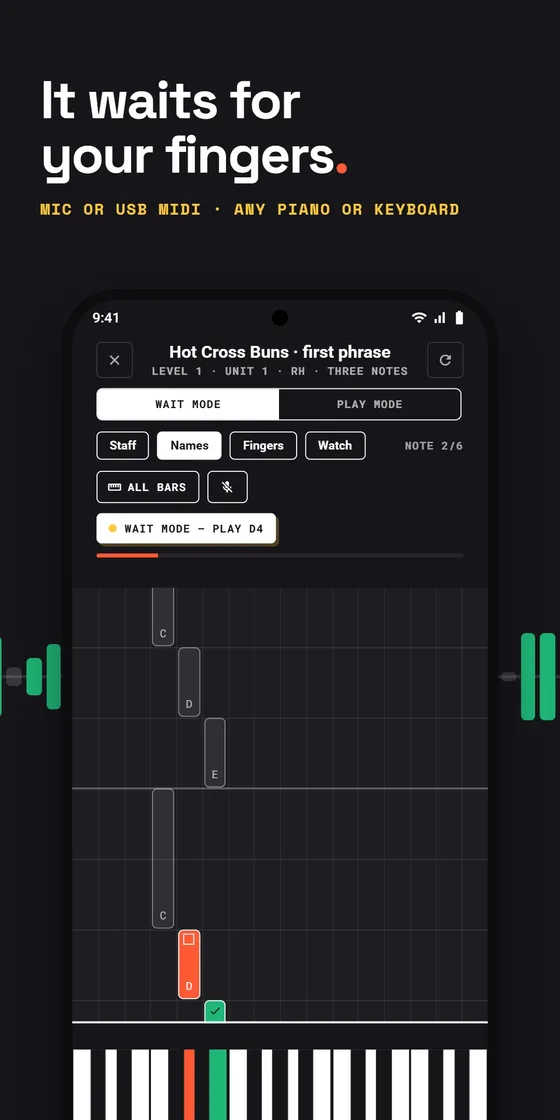
Wait mode never runs ahead.
The score moves when you play the right note. Mic or USB MIDI, any piano or keyboard.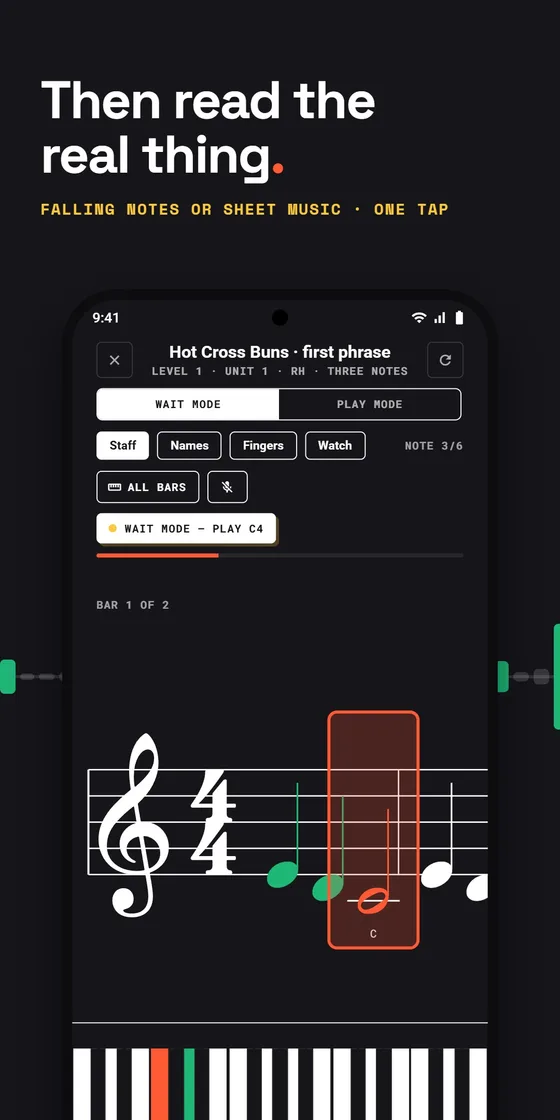
Real sheet music.
Falling notes or an engraved staff with fingering, one tap apart.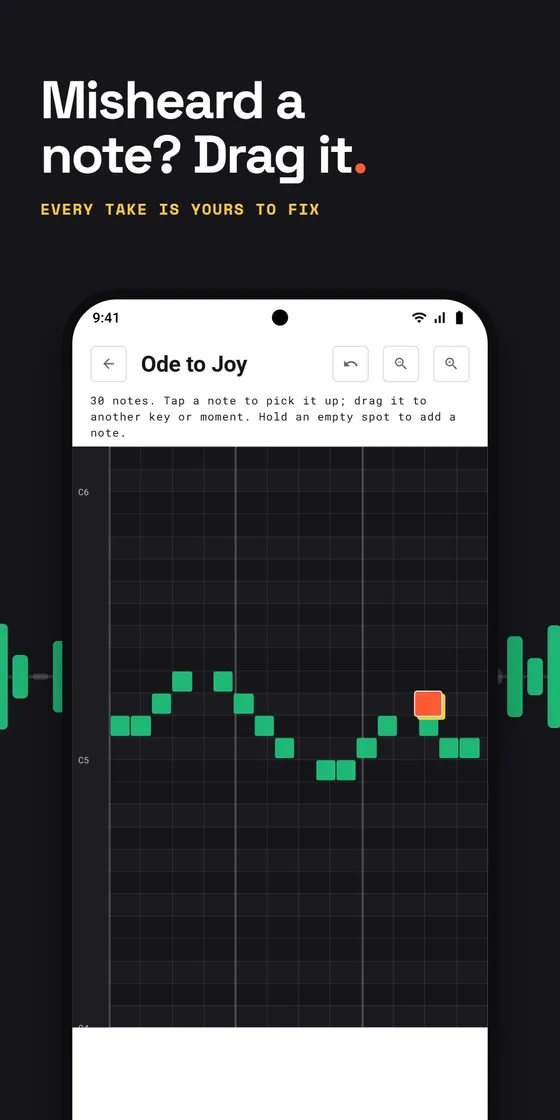
Fix what it misheard.
Drag any note to another key or moment in the editor.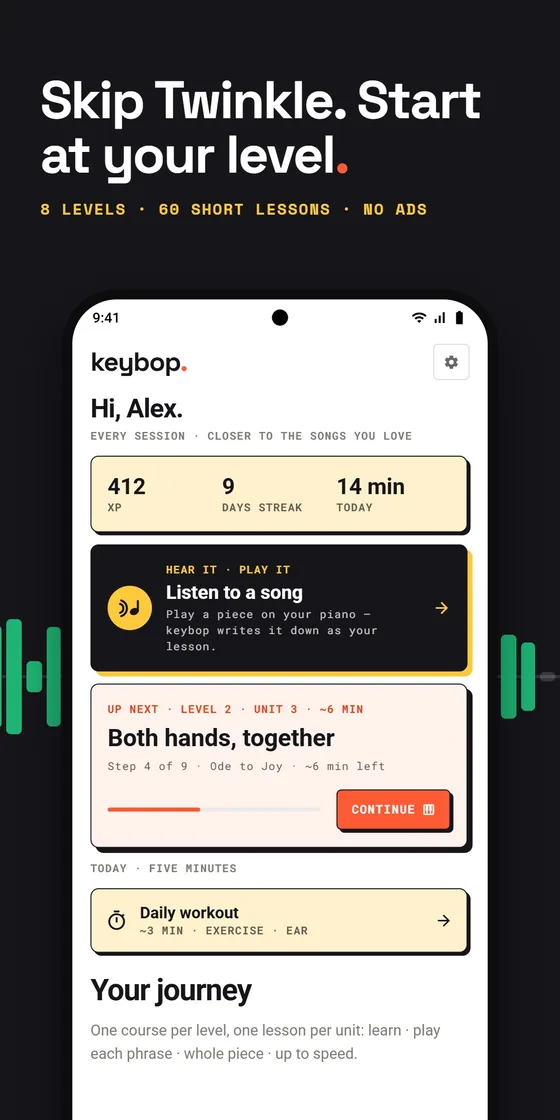
Piano lessons at your level.
Eight levels and 60 short lessons, a daily workout, and no ads.Scroll sideways for more.
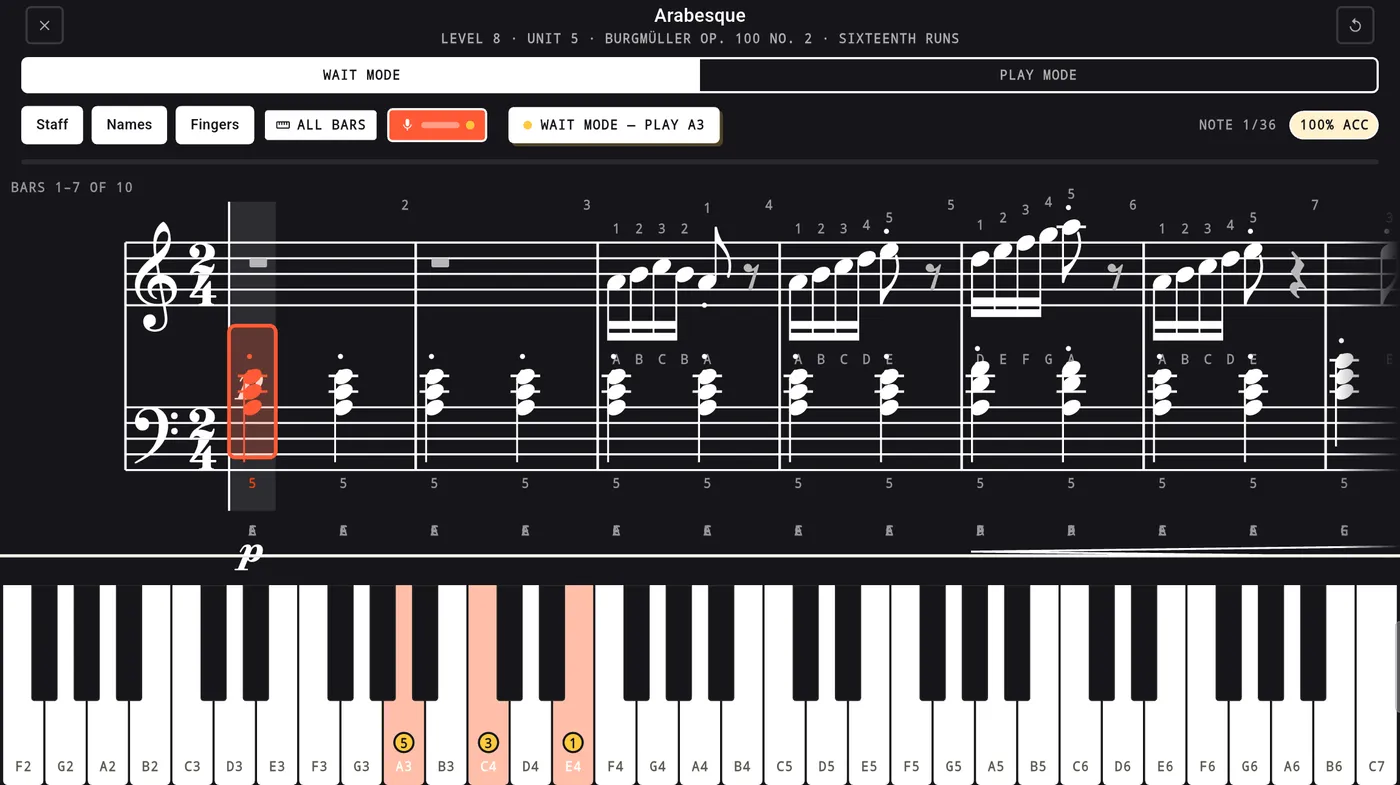
Made for a music stand.On a tablet the score sits above a full-width keyboard with fingering on the keys. Seven bars in view, the mic level in the corner, and the same wait mode.
Write your own. Keep it. Share it.
The composer is a diary for your own music. Play an idea and Keybop writes it down on the staff, named and dated, ready to share.
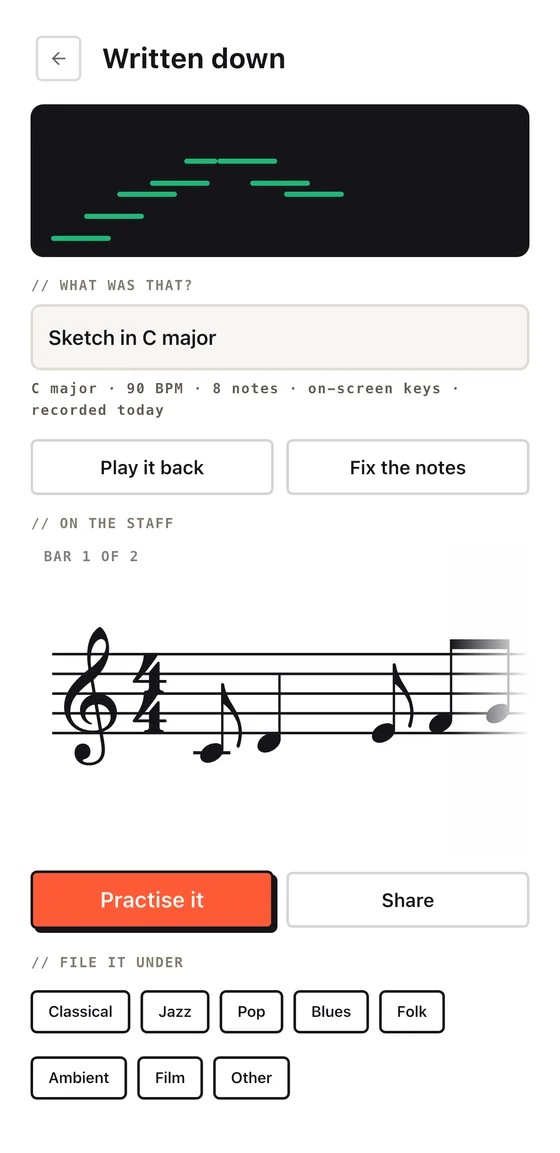
- Record it your way. A MIDI keyboard, the on-screen keys, or your piano out loud. Notes, timing and dynamics are written down.
- A diary of your pieces. Every composition keeps its name, its key and tempo, and the day you recorded it, filed under a genre. Three are kept free; Premium keeps up to 30.
- Fix it, then practise it. Correct any note in the editor, then practise your own piece like any other.
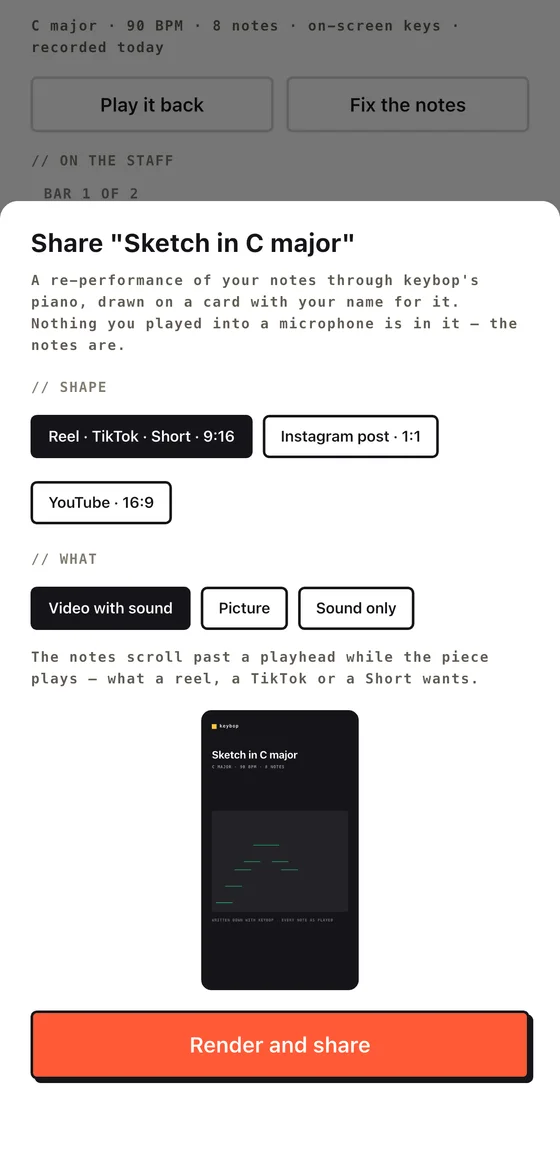
- Share it as a video. 9:16 for Reels, TikTok and Shorts, 1:1 for an Instagram post, or 16:9 for YouTube: with sound, as a picture, or sound only, signed with your name. Every export is re-performed from the notes, never a recording of your room.
I am unsure of 6 bars. They are hatched in the lesson and never counted against you — a wrong note there is mine, not yours.
Learn piano in your first ten minutes.
Nobody who already plays a little should sit through Twinkle. Keybop asks first.
- Say what you can do
Two questions about your goal and what you already play. Keybop places you at level 1, 2 or 3.
- Play one note
A sound check shows the note being heard, so you know the mic or cable works before a lesson starts.
- Learn a phrase in wait mode
Learn cards with animated keyboard diagrams, a warm-up, then the piece phrase by phrase at your own pace.
- Hold up a song
Play anything out loud. Keybop hears it and hands you a lesson you can drill, bar by bar.
And the rest.
- Play mode. Play in time with the metronome from 40% up to full speed. Every note is scored for pitch and timing, one line says what to fix next, and a bar shows how close the next star is.
- Watch and Ghost. Watch plays the passage for you first. Ghost lets you play against your own last attempt.
- Learn by ear. Ear training, play-by-ear, improvisation and sight-reading steps in every level, and a five-minute daily workout built from what you have opened.
- Eight levels, 60 lessons. Short lessons with a warm-up, the piece phrase by phrase, then the whole thing up to speed. Pause any time and Keybop tells you when it is a good place to stop.
- MIDI expression. On a MIDI keyboard your dynamics, articulation and pedal are judged too, not just the notes.
- Either hand alone. Practise the left hand on its own, loop any run of bars hands-free.
- Practice that sticks. Three stars per piece, XP, streaks with a freeze for busy days, spaced warm-ups, and one daily reminder at the hour you actually practise, only if you turn it on. Progress backs up to your account.
Piano app questions, answered.
Is there a piano app that listens to you play?
Yes, that is what Keybop is built around. It hears the notes you play on your own piano through your phone’s microphone, or reads the keys directly over a USB MIDI cable, and the lesson moves on only when you play the right note. When it is unsure of what it heard, it says so instead of marking you wrong.
Does it work with an acoustic piano, or do I need a digital one?
Both work. Through the microphone Keybop hears an acoustic piano, a digital piano, or a keyboard with its speakers on. Connect a MIDI keyboard with a USB cable and it reads the keys directly, including how hard you play and the pedal. No instrument yet? There is a built-in keyboard with real piano sounds.
Is there an app that listens to a song and writes the piano notes?
That is Listen mode. Play the song on your piano, or hold your phone up to a speaker, and Keybop works out the key and the tempo and writes four arrangements: beginner, intermediate, advanced, and exactly what it heard. Each one is split into bars you can drill in wait mode, and you can drag any misheard note to the right place in the editor. It is made for piano music: a solo piano take works best, and a full band mix usually will not come out right. The lesson lives in the app; Keybop does not export PDF, MIDI or MusicXML files.
What is wait mode?
Wait mode shows the next note and waits for you. Play the right note and the score moves on; play a wrong one and you simply try again, and Keybop tells you when you are an octave out. Nothing runs ahead of you. Once you know the notes, Play mode adds the metronome and scores your pitch and timing.
Is Keybop free, or do I need a subscription?
It is free to start and has no ads. The free tier includes three lessons at the level you were placed at, Listen mode with unlimited captures (the first four bars of each lesson to practise, three kept), a new free song every week, and the composer (three pieces kept). Keybop Premium opens every level and every piece: monthly or yearly with a 7-day free trial, or once with a lifetime purchase, so a subscription is optional.
Can adults learn piano with an app?
Adult beginners and returners are who Keybop is built for. It asks about your goal and what you already play and starts you at level 1, 2 or 3, so nobody who already plays a little has to sit through Twinkle. From there it is eight levels and 60 short lessons: a warm-up, the piece phrase by phrase in wait mode, then the whole thing up to speed.
Do I need to read sheet music?
No. Every piece can be shown as falling notes or as properly engraved sheet music with fingering, and one tap switches between them. Start with falling notes and move to the staff when you are ready.
Can I write my own music and share it?
Yes. The composer records what you play on a MIDI keyboard, the on-screen keys or your piano out loud, and writes it on the staff. Each piece keeps its name and the day you recorded it, so the composer works as a diary of what you have written. Share any piece as a video for Reels, TikTok and Shorts, Instagram or YouTube, as a picture, or as sound only. Three compositions are kept free; Premium keeps up to 30.
Does Keybop record my playing?
No audio is ever recorded. The microphone is used only to detect notes: the ones you play while you practise, and a song played near your device in Listen mode or the composer. The sound is analysed on your device and is never stored or uploaded; Keybop keeps only the notes it heard. The privacy policy has the details.
Is there an iPhone or iPad version?
Keybop is on Google Play for Android phones and tablets today. The iPhone and iPad version is on its way.
Honest by design.
Try the whole idea before paying a cent. Keybop Premium opens every level and every piece: monthly or yearly with a 7-day free trial on both plans, or once with a lifetime purchase.
Cancel a subscription any time in Google Play. iOS is coming. Privacy.
- Free: three lessons at the level you were placed at
- Free: Listen mode, unlimited captures, first four bars to practise, three kept
- Free: a new free song every week
- Free: the composer, three pieces kept
- Never: ads, of any kind
- Never: audio stored or uploaded
- Never: a lesson you earned locked again